
Top Declining Keywords
Keyword Position Drops highlights tracked keywords whose latest recorded position is worse than their preceding comparable position.
Overview
Use Position Drops to identify recent ranking losses across the active workspace and selected search group. The table shows the affected keyword, domain, search engine, latest position, previous position, movement and latest ranking URL.
Position Drops is part of Keyword Performance but provides its own focused result set. It displays up to ten of the largest current drops.
Access and data scope
- Position Drops uses the active workspace.
- Results only include domains available to the signed-in user within that workspace.
- The selected search group further narrows the results.
- Each keyword, domain, search group and search engine combination is assessed separately.
- Users only see ranking data permitted by their account and workspace access.
Select the required workspace before opening Position Drops. If you change workspace while the view is already open, reopen the page to ensure the new scope is loaded.
Quick start
- Select the relevant workspace and search group.
- Open Position Drops in Keyword Performance.
- Review the largest negative values in Move.
- Compare Latest with Previous, noting the search engine and domain.
- Select View to open the latest recorded ranking URL.
- Open the keyword’s full history before deciding what action to take.
Understand the table
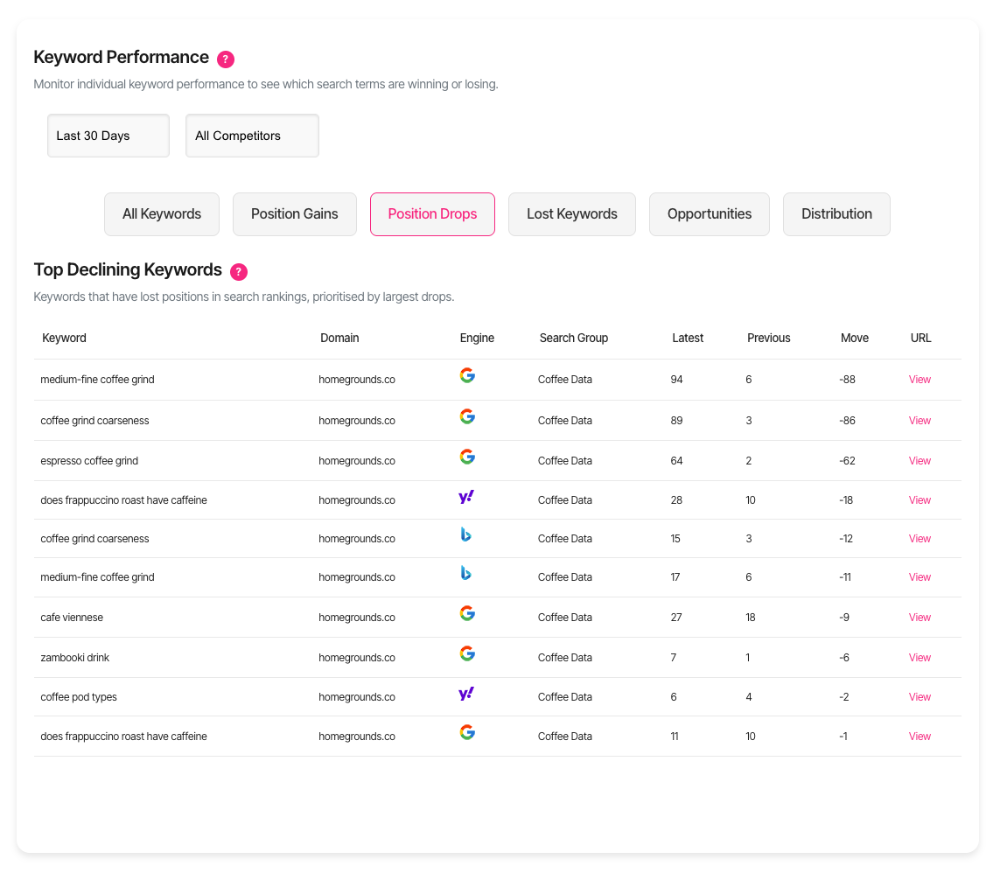
Each row represents one keyword, domain, search group and search engine combination.
- Keyword: The tracked search term.
- Domain: The tracked website.
- Engine: The search engine on which the movement occurred.
- Search Group: The tracking configuration containing the keyword.
- Latest: The most recent recorded position.
- Previous: The preceding recorded position for the same combination.
- Move: The number of positions lost, displayed as a negative value.
- URL: The ranking URL recorded in the latest observation.
Lower position numbers are better. A change from position 8 to position 15 is displayed as −7.
The same keyword can appear more than once when it is tracked across different domains, search groups or search engines.
Understand the comparison
Keywords are normally checked daily, but individual check times can vary. Previous therefore means the preceding recorded observation for that keyword and tracking context; it does not promise the previous calendar day or an identical time of day.
Position Drops compares two stored observations. It does not show any movement between those observations and does not establish why the ranking changed.
Open the keyword’s full chart to review the dates, longer-term direction, volatility, annotations and competitor movement before drawing a conclusion.
Understand the ranking URL
Select View to open the URL associated with the latest ranking observation.
The ranking URL may change between checks. If a different page previously ranked for the keyword, review the wider keyword history and check for possible Keyword Cannibalisation before editing either page.
What should I do next?
- Small one-check drop: Monitor the next observations before making a substantial change.
- Large drop: Check the full chart, annotations and the current ranking URL.
- Drop out of the top ten: Review the result page, competitors and recent changes to the ranking page.
- Different URL now ranks: Investigate whether another page has replaced or is competing with the intended page.
- One engine dropped but another did not: Assess each search engine separately.
- Several related keywords dropped: Look for a shared page, template or site-level cause.
- Need a diagnosis: Open the keyword in Keyword Performance and run Keyword Deep-Dive.
Data timing
Position Drops uses stored tracking observations rather than running a live search when the tab opens. Keywords are generally checked once daily, although completion timestamps can vary.
The view loads when Position Drops is first opened. Changing the search group reloads it when the tab is visible. Refresh the page if newer tracking data or a different workspace is not reflected.
Troubleshooting
- No position drops found: Confirm the active workspace and search group, then check whether any keyword declined between its latest two comparable observations.
- The same keyword appears more than once: Compare the Domain, Engine and Search Group columns; each tracking combination is separate.
- Move differs from another report: Confirm both views use the same workspace, search group and latest completed tracking data.
- The ranking URL is unexpected: The table uses the URL from the latest observation; review the keyword history for a URL change.
- The table has not updated: Reopen Position Drops or refresh the page after tracking completes or the workspace changes.
- View is unavailable for a URL: No valid web URL was recorded for that observation.
- Error loading keyword declines: Refresh the session, confirm access to the workspace and retry.
Frequently asked questions
Does Position Drops show every declining keyword?
No. It displays up to ten of the largest drops in the current accessible scope.
Is Move a percentage?
No. It is the number of ranking positions lost between the compared observations.
Does Previous always mean yesterday?
No. It means the preceding recorded observation for the same keyword, domain, search group and engine. Daily check timestamps can vary.
Does a negative move prove that traffic fell?
No. Traffic impact also depends on the latest position, search demand, result layout and click behaviour.
Does Position Drops explain the cause?
No. It identifies ranking movement. Use the full chart, annotations and Keyword Deep-Dive to investigate.
Can it add an item to the Action Board?
No. Position Drops is read-only.
Does it open Ask Wheremore with analysis context?
No. It does not create a separate analysis report or Ask Wheremore session.
Who can see the data?
Only signed-in users with access to the active workspace and its relevant domains can see the results.