
Competitor Opportunities
Competitor Opportunities highlights tracked keywords where your domain and at least one specified competitor both rank outside the top ten.
Overview
Use Competitor Opportunities to find keywords that may be comparatively open. Neither your domain nor the qualifying specified competitor has secured a top-ten position, so the keyword may offer room for focused improvement.
This is not a competitor-gap report. It does not identify keywords where a competitor already ranks strongly and your domain does not. Instead, it finds keywords where both sides are currently performing outside the top ten.
The summary shows the keyword, search volume, search engine and best recorded rank. Competitor details help determine whether a keyword qualifies but are not itemised in the table.
Access and data scope
- Competitor Opportunities uses the active workspace.
- Results only include domains available to the signed-in user within that workspace.
- The selected search group narrows results to matching keywords, domains and search engines.
- Account relationships and shared access are respected when determining which tracking data is available.
- Results depend on the competitors specified in the relevant tracking configuration.
Select the required workspace and search group before opening Opportunities. Refresh the page if a workspace change is not reflected in an already open view.
Quick start
- Select the relevant workspace and search group.
- Open Opportunities in Keyword Performance.
- Review the highest-volume keywords first.
- Check Best Rank to understand the strongest recorded position represented by the opportunity data.
- Note the search engine because each engine is assessed separately.
- Open the keyword in the wider Keyword Performance view before deciding what to optimise.
Understand the opportunity rule
A keyword qualifies when:
- Your tracked domain’s best rank is outside the top ten.
- At least one specified competitor is present for the same keyword and search engine.
- That qualifying competitor’s best rank is also outside the top ten.
The feature therefore surfaces keywords that may be “for the taking”. It does not promise that the keyword will be easy to win, and it does not mean that no other website ranks strongly.
Only competitors configured for the tracking context contribute to qualification. The summary deliberately does not list their individual domains or positions.
Understand the table
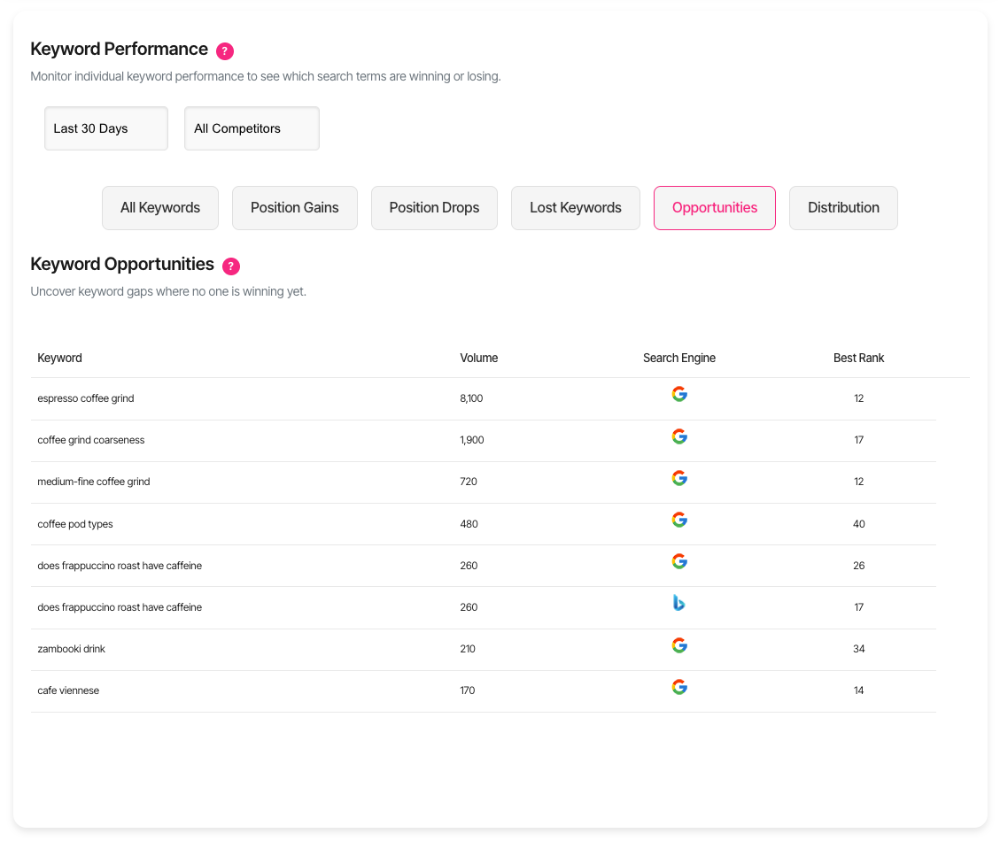
- Keyword: The tracked search term.
- Volume: The available search-volume estimate for the keyword.
- Engine: The search engine represented by the opportunity.
- Best Rank: The best rank recorded in the opportunity summary for the tracked context.
Lower ranking numbers are better. Because qualifying ranks are outside the top ten, the displayed Best Rank should be greater than 10.
Search volume is an estimate and should be used as a prioritisation signal rather than a traffic forecast.
Prioritise opportunities
Consider several signals together:
- Higher volume may indicate greater potential demand.
- A rank close to the top ten may require less movement than a much weaker position.
- Strong relevance to the organisation’s services, products or audience should take priority over volume alone.
- Existing page quality may determine whether optimisation or new content is appropriate.
- Result-page features and search intent can affect the value and difficulty of the opportunity.
- Business value should determine whether improved visibility would support meaningful outcomes.
Review the current result page and keyword history before treating an opportunity as an action plan.
Pagination and ordering
Results are ordered by search volume from highest to lowest, then alphabetically by keyword. The view displays ten entries per page.
Use the pagination controls to move between pages. The footer shows the visible range and total number of qualifying entries.
Changing the search group returns the view to the first page and reloads the results.
Data timing
Competitor Opportunities uses stored ranking and competitor-opportunity data. It does not run a live search when the tab opens.
Keyword rankings are generally updated daily, although individual completion times can vary. Refresh the page after newer tracking data becomes available if the existing view remains visible.
What should I do next?
- Confirm that the keyword is relevant to the intended audience and business goals.
- Review your current ranking page and whether it matches the search intent.
- Inspect the full keyword history for volatility and recent movement.
- Review the live result page to understand who currently occupies the top ten.
- Decide whether to improve an existing page, resolve competing owned URLs or create new content.
- Use Keyword Deep-Dive when a fuller diagnosis is required.
Competitor Opportunities is a discovery view. It refers you to further investigation rather than creating work automatically.
Troubleshooting
- No opportunities found: Confirm the workspace, search group and configured competitors. There may be no keyword for which your domain and a specified competitor both rank outside the top ten.
- A competitor is not shown: Competitor details are intentionally not itemised in this summary.
- A competitor ranks in the top ten: That competitor does not qualify the keyword under this rule. Another specified competitor outside the top ten may still qualify it.
- A keyword from another group appears: Re-select the intended search group and reload the view.
- The same keyword appears more than once: Search engines and tracked domains are assessed separately.
- Volume differs from another source: Search-volume figures can vary by source, scope and update time.
- Results did not change after switching filters: Retry the filter or refresh the page after the current request finishes.
- Error loading opportunities data: Refresh the session, confirm workspace access and retry.
Frequently asked questions
Does an opportunity mean a competitor is already winning?
No. The qualifying competitor is also outside the top ten.
Does it mean nobody ranks in the top ten?
No. Other websites may rank strongly. The rule only compares your domain with the specified competitors represented in the tracking data.
Why are competitor domains not listed?
They are used to qualify the opportunity, but this view is designed as a concise keyword shortlist.
Does Best Rank show the current live position?
No. It comes from stored opportunity data and is not an on-demand live search.
Does the feature show every opportunity at once?
No. Results are paginated with ten entries per page.
Can Opportunities add an item to the Action Board?
No. The view is read-only and refers users to further investigation.
Does it start an Ask Wheremore analysis?
No. It does not create an analysis report or Ask Wheremore session.
Who can see the results?
Only signed-in users with access to the active workspace and relevant domains can see them.